

February, 2026
Integrating AI with Selenium Automation: Smarter, Self-Healing Test Suites

- Talib Hussain
Introduction
Selenium has been a cornerstone of UI automation testing for years. It is powerful, flexible, and widely adopted across the industry. However, maintaining large Selenium test suites in fast-moving projects often becomes challenging as applications evolve.
Flaky tests, brittle locators, and frequent UI changes are common problems that automation engineers face on a daily basis. Over time, these issues increase maintenance effort and reduce confidence in test results.
This is where Artificial Intelligence (AI) is starting to transform Selenium automation testing.
By integrating AI with Selenium, teams can build smarter and more resilient automation frameworks. Capabilities such as self-healing locators, AI-powered visual testing, and intelligent test data generation help reduce false failures and improve test stability.
In this article, we’ll explore how AI enhances Selenium automation, the key benefits of this integration, and practical tools that can be applied to real-world test automation projects.
Why AI in Selenium?
By incorporating AI into Selenium automation, one can benefit in the following ways:
- Self-Healing Locators: AI automatically updates the locators when the UI elements change, ensuring tests continue to run smoothly.
- Smart Test Execution: AI identifies and prioritizes test cases based on previous failures and changes in the application, improving efficiency.
- Flaky Test Reduction: AI uses adaptive waits and an automated retry mechanism to make tests more reliable and less prone to failures.
- Visual Testing with AI: AI-powered image comparison helps ensure the user interface remains consistent across different runs.
- Test Data Generation: AI creates intelligent test data that enhances test coverage and real-world scenario simulation.
Core Aspects of Selenium AI
Here are the main features of Selenium AI:
- Adaptive Element Identification: It can recognize user interface elements even if their attributes or layout change, often by using visual or pattern-based methods.
- Predictive Failure Detection: It looks at past test results to identify areas that are more likely to fail.
- Dynamic Test Adjustments: It can modify or create test steps based on how the application behaves.
- Test Prioritization: It focuses on the most critical areas first, helping to save time while ensuring comprehensive coverage.
- Self-Healing Scripts: It automatically updates tests when there are small changes to the user interface, reducing the need for manual fixes.
Integrating AI into Selenium Testing
Combining Selenium with AI can improve the test automation process by making it more efficient, self-healing, and optimized.
AI-Based Visual Testing:
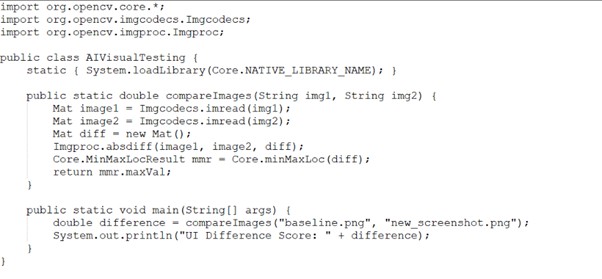
Selenium is not able to detect user interface issues such as broken images or misalignment problems. But using Selenium AI, we can more effectively identify these types of UI issues. There are several AI-based libraries available in Java that can be combined with Selenium. One example of such a library is OpenCV.
How it works?
- Install the OpenCV library and connect it with Selenium WebDriver.
- Load the OpenCV native library within the Java Class.
- Take a screenshot of the webpage using the Selenium WebDriver.
- Compare the initial screenshot with the new one.
- This helps identify any changes in the user interface visually.
- It stops unnoticed changes in the user interface from going undetected.
Implementing Self-Healing Locators:
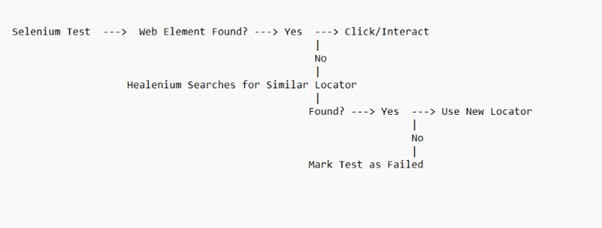
Healenium automatically identifies and fixes broken locators without requiring manual updates. It assists in resolving failed locators in Selenium by using AI-driven scripting for self-healing UI test automation. When a locator fails due to changes in the UI, instead of the test stopping, Healenium dynamically locates and repairs the issue, thereby minimizing the need for manual intervention.
To connect Healenium with Selenium, you need to include the following dependencies in the pom.xml file.
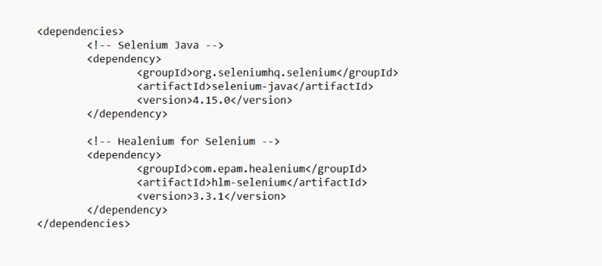
- Add Healenium dependencies in the pom.xml file.
- In your Base.java file, set up Healenium with the Selenium Webdriver as shown in the attached image below.
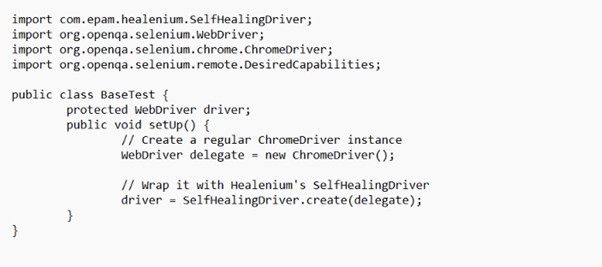
- Now, whenever a locator fails, Healenium will try to find another one and fix the test.
- Modify your page objects to use Healenium locators instead of the usual Selenium locators:
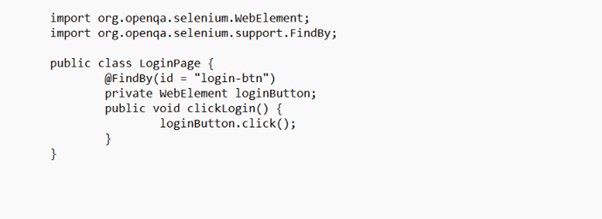
- Even if the ID of the login-btn changes, Healenium will identify it and update it automatically.
The image below shows how Healenium works:
- Flakiness Mitigation with AI-Based Adaptive Waits:
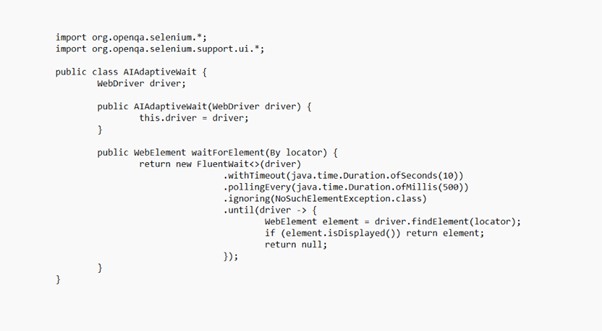
AI can change wait times as needed based on how the web page is updating, instead of using set times with Thread. Sleep ().
How it works?
- Polling frequency is driven by AI rather than constant delays.
- Automatically changes according to the speed of page loading.
- Reduces flaky test failures.
AI for Test Data Generation:
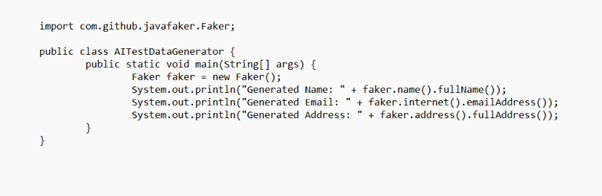
Test data creation is time-consuming and prone to errors. Better test coverage can be facilitated using testing frameworks that are based on the AI capabilities of creating synthetic test data, random test data, and edge case test data.
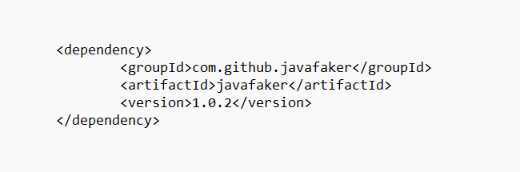
Using the Faker Java library, it is possible to generate a number of test data. You need to add the following dependency in the pom.xml file.
Implementation Using Faker Library
How it works?
- Relies on AI-based Faker to create various data.
- Reduces dependency on hard values.
- Enhances test coverage by using a variety of input data.
The Future of AI in Selenium
AI in Selenium is no longer just a concept or a future promise — it is already changing how test automation is built and maintained. By making automation smarter, more adaptable, and less brittle, AI helps teams move away from constant script maintenance and focus on test quality instead.
As AI technologies continue to mature, we can expect Selenium test suites to become more predictive, capable of identifying unstable tests early, generating meaningful test scenarios automatically, and reducing flaky failures with minimal manual intervention. For teams working with large or frequently changing applications, AI-driven automation will increasingly become a practical necessity rather than an optional enhancement.

Talib Hussain
Talib Hussain works as a Senior SQA Automation Engineer at TenX